CSC 325 Operating Systems with an Emphasis on UNIX
Chapter 4: Processes
- Process Concepts
- Process Scheduling
- Processes Creation and Termination
- Cooperating Processes
- Threads
- Interprocess Communication
Process Concepts
- An operating system executes a variety of programs:
- Batch system - jobs
- Time-shared systems - user programs or tasks
- Textbook uses the terms job and process almost interchangeably.
- Process - a program in execution; process execution must progress in a sequential
fashion.
- A process includes:
- program counter
- stack
- data section
- As a process executes, it changes state.
- New: The process is being created.
- Running: Instructions are being executed.
- Waiting: The process is waiting for some event to occur.
- Ready: The process is waiting to be assigned to a processor.
- Terminated: The process has finished execution.
- Zombie: A process's whose parent has terminated
- Diagram of process states:

- Process Control Block (PCB) - Information associated with each process.
- Process ID (name, number)
- Process state
- Priority, owner, etc...
- Program counter
- CPU registers
- CPU scheduling information
- Memory-management information
- Accounting information
- I/O status information
UNIX Process Image
- User-Level Context
- Process Text -machine code
- Process Data-variables, etc.
- User Stack
- Shared Memory
- Register Context
- Program Counter
- Process Status Register
- Stack Pointer-To user or kernel stack
- General Purpose Registers
- System Level Context
- Process Table Entry - Statuses, pointers, Process size, PID, PPID, link to next process in Ready queue, Priorities, timers, etc.
- U Area -Signal Handler array, return value of system calls, I/O parameters, etc.
- Per Process Region Table - Mapping from Virtual to Physical Addresses
- Kernel stack
Process Scheduling
- Process scheduling queues
- job queue - set of all processes in the system.
- ready queue - set of all processes residing in main memory, ready and waiting to
execute.
- device queues - set of processes waiting for a particular I/O device.
- Process migration between the various queues.

- Schedulers
- Long-term scheduler (job scheduler) - selects which processes should be brought into the
ready queue.
- Short-term scheduler (CPU scheduler) - selects which process should be executed next and
allocates CPU.

- Short-term scheduler is invoked very frequently
(milliseconds) => (must be fast).
- Long-term scheduler is invoked very infrequently
(seconds, minutes) => (may be slow).
- The long-term scheduler controls the degree of multiprogramming.
- Processes can be described as either:
- I/O-bound process - spends more time doing I/O than computations; many short CPU bursts.
- CPU-bound process - spends more time doing computations; few very long CPU bursts.
Context Switch
- When CPU switches to another process, the system must save the state of the old process
and load the saved state for the new process.
- Context-switch time is overhead; the system does no useful work while switching.
- Time dependent on hardware support.
Process Creation
- Parent process creates children processes, which, in turn create other processes,
forming a tree of processes.
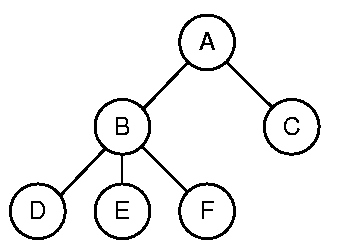
Example Process Tree
- Resource sharing - several possibilities
- Parent and child processes share all resources.
- Child processes share subset of parent's resources.
- Parent and child share no resources.
- Execution - only 2 choices.
- Parent and child execute concurrently.
- Parent waits until child terminates.
- Address space - 2 choices
- Child process is a duplicate of parent.
- Child process has a different program loaded into it.
- UNIX examples
- fork system call creates new process.
- The new process is an exact copy of the parent and continues execution from the same
point as its parent.
- The only difference between parent and child is the value returned from the fork call which is:
- 0 for the child process.
- the process id (pid) of the child, for the parent process. This is so the parent process knows the name of the child.
- The execve system call used after a fork to replace the process' memory space with a new program.
Process Termination
- Process executes last statement and asks the operating system to delete it (exit).
- Output data from child to parent (via fork).
- Process' resources are deallocated by operating system.
- Parent may terminate execution of children processes (via abort or kill).
- Child has exceeded allocated resources.
- Task assigned to child is no longer required.
- Parent is exiting.
- many operating systems (including UNIX) do not allow child processes to continue if its parent terminates.
- It is called cascading termination when a parent with child processes terminates.
Cooperating Processes
- Independent process cannot affect or be affected by the execution of another process.
- Cooperating process can affect or be affected by the execution of another process.
- Advantages of process cooperation:
- Information sharing
- Computation speed-up
- Modularity
- Convenience
Producer-Consumer Problem
- Paradigm for cooperating processes; producer process produces information that is
consumed by a consumer process.
- unbounded-buffer places no practical limit on the size of the buffer.
- bounded-buffer assumes that there is a fixed buffer size.
Threads
- A thread (or lightweight process) is a basic unit of CPU utilization; it consists of:
- program counter
- register set
- stack space
- A thread shares with its peer threads its:
- code section
- data section
- operating-system resources
- A traditional or heavyweight process is equal to a task with one thread.
- In a task containing multiple threads, while one server thread is blocked and waiting, a
second thread in the same task could run.
- Cooperation of multiple threads in same job confers higher throughput and improved
performance.
- Applications that require sharing a common buffer (producer-consumer problem) benefit
from thread utilization.
- Threads provide a mechanism that allows sequential processes to make blocking system
calls while also achieving parallelism.
Types of threads
- Kernel-supported threads; OS supports threads directly.
- Overhead for thread creation.
- User-level threads; supported above the kernel, via a set of library calls at the user
level .
- Can not use multiple processors.
- Hybrid approach implements both user-level and kernel-supported threads.
- Two types of threads you are likely to see:
- POSIX threads
POSIX is a standard for UNIX systems - the standard includes a thread library.
- WIN32 threads
- those available on Windows 95 and NT.
Interprocess Communication (IPC)
Provides a mechanism to allow processes to communicate and to synchronize their
actions.
- Message system - processes communicate with each other without resorting to shared
variables.
- IPC facility provides two operations:
- send(message) - messages can be of either fixed or variable size.
- receive(message)
- If P and Q wish to communicate, they need to:
- establish a communication link between them
- exchange messages via send/receive
Implementation questions:
- How are links established?
- Can a link be associated with more than two processes?
- How many links can there be between every pair of communicating processes?
- What is the capacity of a link?
- Is the size of a message that the link can accommodate fixed or variable?
- Is a link unidirectional or bidirectional?
Direct Communication
- Processes must name each other explicitly:
- send(P, message) - send a message to process P
- receive(Q, message) - receive a message from process Q
- Properties of communication link
- Links are established automatically.
- A link is associated with exactly one pair of communicating processes.
- Between each pair there exists exactly one link.
- The link may be unidirectional, but is usually bidirectional.
Indirect Communication
- Messages are directed and received from mail boxes (also referred to as ports).
- Each mailbox has a unique id.
- Processes can communicate only if they share a mailbox.
- Properties of communication link
- Link established only if the two processes share a mailbox in common.
- A link may be associated with many processes.
- Each pair of processes may share several communication links.
- Link may be unidirectional or bidirectional.
- Operations
- create a new mailbox
- send and receive messages through mailbox
- destroy a mailbox
- Mailbox sharing
- P1 , P2 , and P3 share mailbox A.
- P1 sends; P2 and P3 receive.
- Who gets the message?
- Solutions
- Allow a link to be associated with at most two processes.
- Allow only one process at a time to execute a receive operation.
- Allow the system to select arbitrarily the receiver. Sender is notified who the receiver
was.
Buffering - queue of messages attached to the link; implemented in one of three ways.
- Zero capacity - 0 messages Sender must wait for receiver (rendezvous).
- Bounded capacity - finite length of n messages Sender must wait if link full.
- Unbounded capacity - infinite length Sender never waits.
Exception Conditions - error recovery
- Process terminates
- Lost messages
- Scrambled Messages
Pipes
A pipe is a simple method for communicating between two processes.
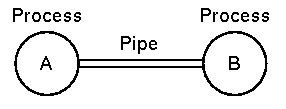
- As far as the processes are concerned the pipe appears to be just like a file.
- When A performs a write, it is buffered in the pipe.
- When B reads then it reads from the pipe, blocking if there is no input.
- in UNIX (and DOS) one process can be piped into another pipe using the '|' character.
- Pipes may be implemented using shared memory (UNIX) or even with temporary files (DOS).
UNIX Pipes
This section will deal with the simplest and most used interprocess communication (IPC) mechanism in UNIX, namely pipelines.
A pipe is a one-way communication channel defined by two file descriptiors, one open for writing and one for reading, such that what is written by the former can be read by the latter. A pipe is created by passing and array of two integers to the pipe() system call. Note that the data flowing in a pipe are managed directly by the kernel, so you can think of them flowing "through'' the kernel.
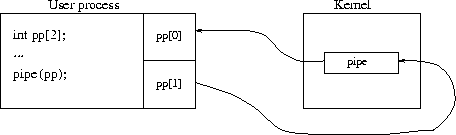
A UNIX pipe.
Pipes make it nice for the sharing of file descriptors between parent and children. If you first open a pipe, and then spawn a child, parent and child will share the pipe's file descriptors as well, so you get the scenario depicted as follows:
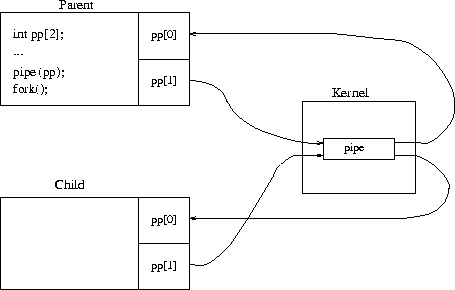
A UNIX pipe after forking.