Introduction to Robotics
Designing a simple program and taking measurements
Objectives
- Begin using the RoboLab icon-based programming environment
- Begin to learn about actuators and effectors
- Begin measuring and testing of robotic behavior
Tools and Parts Needed
- Constructed 2-wheel robot with 6 batteries
Glossary
- RoboLab is icon-based programming language based upon the LabView language.
- Firmware consists of programs which are installed semi-permanently into memory.
The RoboLab Software
In order to avoid a software conflict between the Windows 7 operating system and LabView (which under girds RoboLab), we will be running RoboLab in a virtual machine. We will set up this virtual machine in class.
Then we will run RoboLab from within the virtual machine.
Try to avoid downloading the firmware. Downloading firmware takes several minutes and should only need to be done when all batteries have been removed for too long. Note that Firmware consists of programs which are installed semi-permanently into memory. The firmware will already be installed on the robot unless you remove all of the batteries, so please do not do this.The Programmer Area of RoboLab
The instructors will help you to move around in this area. In general, we will work in teams. Be sure to try all of the jobs.
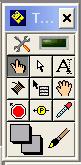
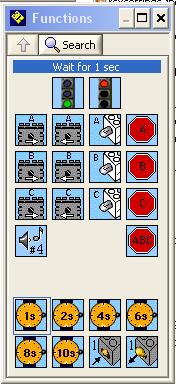
Two important windows in RoboLab are the Tools Window and the Function windows respectively, which can always be found under the Window Menu.
Pseudo-code
What is pseudo-code? The term "pseudo" is a Greek word means "false." Pseudo-code is widely understood to be a the step-by-step outline of a computer program which is written in plain English. It is in some sense a "false" computer program which can be easily translated into a computer language.In particular, pseudo-code is a step-by-step description of what an algorithm is supposed do, expressed in a formally-styled human language like English rather than in a programming language like RoboLab. After reading pseudocode a computer programmer should be able to create the computer program because the pseudo-code includes sufficiently many steps.
Example of simple pseudo-code program for a two wheeled RCX robot which drives forward for 1 second:
- Begin program
- Send power to motors A and C for 1 second each
- Stop all motors
- End program
Computer Program written in RoboLab
A computer program is an algorithm written in a language which can be directly translated into a code that can be executed by the computer or robot.A RoboLab
program which translates the pseudo-code program above into
the computer programming language RoboLab:

Your Team Roles
In most labs we will have the roles which will be rotated through.- Scribe and Robot Handler: This person will guide the discussion and type the Lab Report as you work on this lab. The scribe should have Word (or another editor program) open on his/her laptop. This role also handles the robot.
- Programmer: This person will be the primary person responsible for creating and running the RoboLab program and will submit the required RoboLab programs. The programmer should have RoboLab open on his/her laptop and should have the IR tower connected to his or her computer.
Your Lab Report
All lab reports should be self-contained and should contain the primary roles each person played at the top. Such as the following- Lab number: L3
- Time in Roles
- Scribe and Robot Handler:
- Programmer:
- First Program: Use
RoboLab to write a program in which the robot drives forward for
1 second. Upload this program onto your robot. Then take your
robot into the hallway. We will be running this program 5 times
and taking two measurements (distance traveled and offset from
straight) based upon the floor tiles (the units will be floor
tiles--see diagram.)
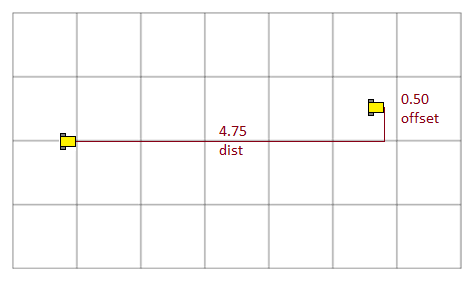
Run this program 5 times and for each run record your distance and offset measurements BOTH in your lab report AND into the shared Google document: https://docs.google.com/spreadsheet/ccc?key=0Ap2jzLp3T3K_dDlrZmJFRkRNbDhGTzJ3VVl6a01hLXc
In RoboLab, explanatory comments are added to a program using the Edit Text button: .
Please add the following type of comment on the Lab number and
the identities of the members of your team to the top of your
RoboLab program:
.
Please add the following type of comment on the Lab number and
the identities of the members of your team to the top of your
RoboLab program: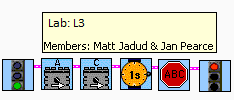
Save this program as Save this program as yourusername1-yourusername2-L3.vi (eg. Mine might be pearcej-jadudm-L3.vi) - Modify Program:
Use RoboLab to
modify your saved program so that the robot drives backwards for 1 second.
Upload this program onto your robot. Run this modified program 5 times and for each run record your distance and
offset measurements BOTH in your lab report AND into the shared Google
document: https://docs.google.com/spreadsheet/ccc?key=0Ap2jzLp3T3K_dDlrZmJFRkRNbDhGTzJ3VVl6a01hLXc
- Reflection on direction: In
1-2 paragraphs reflect on which direction worked best by giving the most consistent and straight behavior. Discuss what you believe might have contributed to this result.
- Modify Program Again:
Use RoboLab to
modify your saved program so that the robot drives in its best direction (forward or backwards) for 2 seconds.
Upload this program onto your robot. Run this modified program 5 times and for each run record your distance and
offset measurements BOTH in your lab report AND into the shared Google
document: https://docs.google.com/spreadsheet/ccc?key=0Ap2jzLp3T3K_dDlrZmJFRkRNbDhGTzJ3VVl6a01hLXc
- Reflection on doubling: In
1-2 paragraphs reflect on whether your 2 second distance measurements
were double the values of the 1 second distance measurements in the same direction. If
so, explain why, and if not, discuss what you believe might have
contributed to this result.
- Reflection on variation: In 1-2 paragraphs reflect on what you
believe is contributing to the variation in the distance and the
offsets in the data you collected.
- Comments and Suggestions: Discuss this
lab in your team and write a
paragraph that
summarizes your team's reaction to RoboLab and to this lab. If there
are any problems you encountered or any questions that remain, please
ask! Also, be sure to include any suggestions you have for how this lab
could be improved.
- Submission: The person who served as the primary Scribe should submit the report yourusername1-yourusername2-L3.docx and the person who served as the primary programmer should submit the last version of the RoboLab program saved as yourusername1-yourusername2-L3.vi. If there is a third team member, that team member can submit the names of his or her other team members. Before leaving, you should make certain that all team members have all of the files (email them to one another or pass them around on a flash drive.)