Using Sonar
Objectives
- Learn to use sonar on the NXT
- Practice event-driven programming.
Tools and Parts Needed
- Constructed 2-Wheeled NXT Robot
- Appropriate sensors
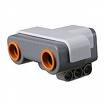 In this lab, we will be exploring the NXT ultrasonic distance sensor
which looks like the image to the right.
In this lab, we will be exploring the NXT ultrasonic distance sensor
which looks like the image to the right. The ultrasonic "sonar" distance sensor detects objects in front of the sensor by emitting a short high-frequency sound and then listening for the echo. If an echo comes back there is an object in front of it. The time it takes for the echo to return can be used to measure the distance to the object. If there is no echo within some time limit the situation is interpreted as no object. The sensor can read distances between 1 cm and 255 cm, but it is most accurate between 6 to 180 cm.
Your Task
Your task is to create a "sentry robot" which will monitor a doorway by hiding alongside the inside of the doorway.Mount Sonar
First, mount your sensor to read in the forward direction. One way to do this is to use the following parts to mount on the underside of the NXT brick:
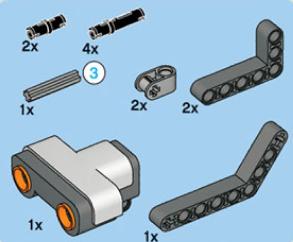
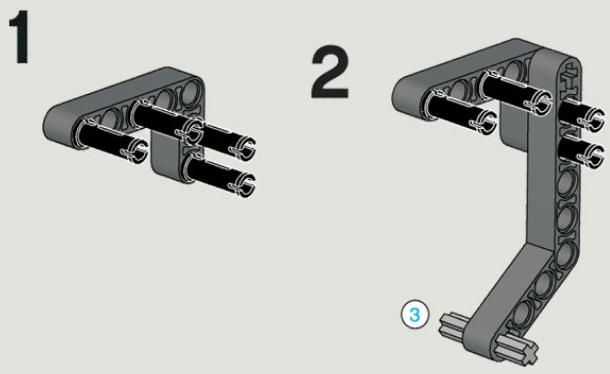
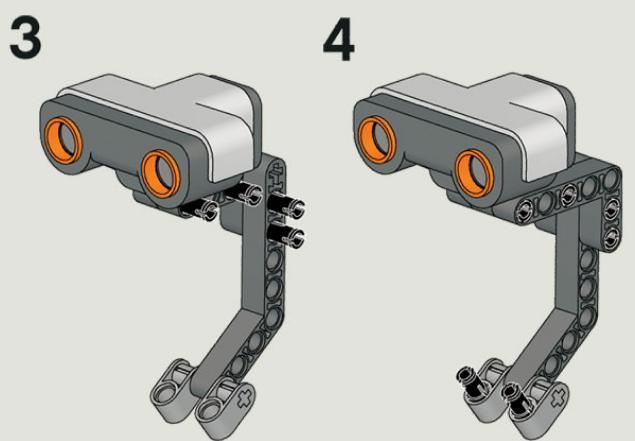
After mounting your sonar sensor, measure the distance to the other side of the doorway using the sonar sensor.
Sonar in RoboLab
At this point, you should be fairly adept at finding icons in Robolab and reading the help screens, but let me point out that there are 5 new icons worth reading about.
 are sonar "wait fors" and are located in the "wait for area." (One of
these will be useful for the first part of the task.)
are sonar "wait fors" and are located in the "wait for area." (One of
these will be useful for the first part of the task.) are sonar "events" and are located in the "event area." (One of these
will be useful for the second part of the task after the intruder has
first been detected.)
are sonar "events" and are located in the "event area." (One of these
will be useful for the second part of the task after the intruder has
first been detected.) is used to set a container to the value of the sonar distance sensor.
(This is needed to store the distance to where the intruder appeared.)
is used to set a container to the value of the sonar distance sensor.
(This is needed to store the distance to where the intruder appeared.)Sonar Sentry Task
Next design a program to monitor the doorway as follows:
If anything (like a hand) breaks the sonar beam, then the robot should:
- Drive to the exact place where the intruder passed through. (Hint be sure to store this distance in a container!)
- Stop driving but begin continuously sounding an alarm and slowly turning in place.
- As the robot is turning it will continue "looking for that
intruder" to try to escape using event-driven programming. By
"looking for that intruder, the robot needs to monitor withing a
distance which is smaller than the closest door-jam. See diagram
below:
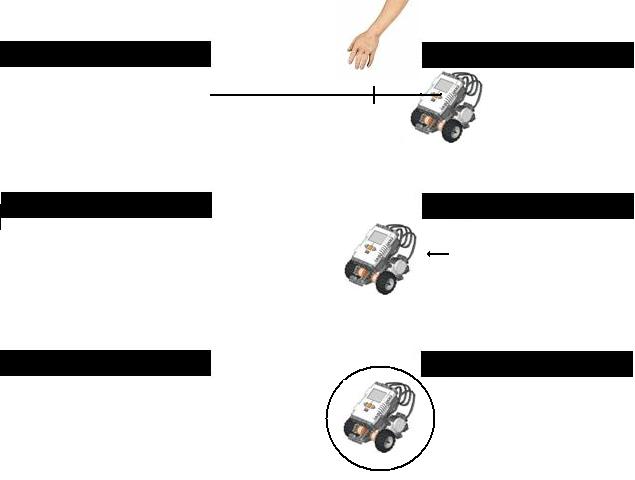
- Hints on the "smaller than the closest door-jam" computation: Note that there are currently two door jams within "sight" of the robot. One is the distance the robot just drove, while the other is the width of the door jam less the distance the robot just drove. Unless the intruder came exactly through the middle of the doorway, one of those two distances is smaller, (but you as the programmer don't know which one because you don't know which side of the door the intruder came through.) So, you may need a second container to store the smaller of these numbers. The wheel-base of the robot is 4 inches, which is a bit more than 10 centimeters, so up to this amount may be deducted if you find the robot detecting the doorway when spinning.
- If while the robot is spinning and monitoring for an intruder within that distance, "smaller than the closest door-jam," the robot should immediately stop turning (pointing towards where that intruder was last seen.) And, the robot should make a sad, pathetic, exhausted kind of set of noises.... (Use your judgment how to do this.) Because the robot realizes that it just let the intruder get away.
- Recall how to driving the NXT
Straight
To drive the NXT straight, we should synchronize the wheels and then drive forward. The formula for the circumference of a circle is Diameter x PI. The NXT wheels are 2.25 inches in diameter so we can find the distance traveled with two wheels synchronized in 1 rotation of the wheel as 2.25 inches x PI = 2.25 x 3.14159... = 7.0688 inches =18.0 cm. You may use this number to compute distances traveled as long as you understand that each revolution of the wheel is 360 degrees.

Next, implement this algorithm in RoboLab:
- Be sure to include explanatory comments to your RoboLab
code by using the Edit Text icon:
 In particular, it is
required that you add the following comments:
In particular, it is
required that you add the following comments:
- Lab L17
- All of your team member's names
- Appropriate comments on the computation of the turn.
- Comments about what the robot will do if the user enters 0 clicks, 1 click, and more than 8 clicks.
- Finally, modify your pseudocode, robot, and RoboLab program to improve your robot's performance.
- Answer the questions in your Lab Report.
Your Lab Report
All lab reports should be self-contained and should contain all of the following information at the top:- The lab number: Lab L17
- How long each person served in each of the roles:
- Driver:
- Navigator
- Your Pseudocode: Include the final version of your pseudocode in your Lab Report.
- Your Robot: Briefly describe which sensors and actuators need to be attached to which ports for your implementation.
- Computation: Explain your distance computation and how you arrived at this algorithm.
- Your Success: In a paragraph or so, describe how to use your program and whether or not your robot functions as desired. If not, what goes wrong and under what conditions?
- Outreach: In its current state, this lab is probably not ready for our outreach to children. Brainstorm ideas for improving the robot's behavior for outreach. Then in your report, expand on the top one or two of these ideas.
- Comments and Suggestions: Write a paragraph that summarizes your team's reaction to RoboLab and to this lab. If there are any problems you encountered or any questions that remain, please ask! Also, be sure to include any suggestions you have for how this lab could be improved.