CSC 126 Robotics
Introducing the AIBO
Objectives
- Learn about the legged robot named AIBO
- Learning about AIBO's motors and sensors
Tools and Parts Needed
- One ERS-7 model AIBO who has been named.
About AIBO
The AIBO is a robotic dog manufactured by the Japanese company, Sony. The name AIBO is an acronym for Artificial Intelligence roBOT, but in Japanese, the word AIBO also means "partner" or "companion." The first model was the ERS-110,
released in 1999. The model we will be working with is the most recent, the ERS-7 running Mind 3 software.
The AIBO is able to adapt and learn from interaction with people and its environment.
It is equipped with a number of sensors for detecting distance, motion, and touch.
AIBO also has face and voice recognition and can respond to several different voice
commands.
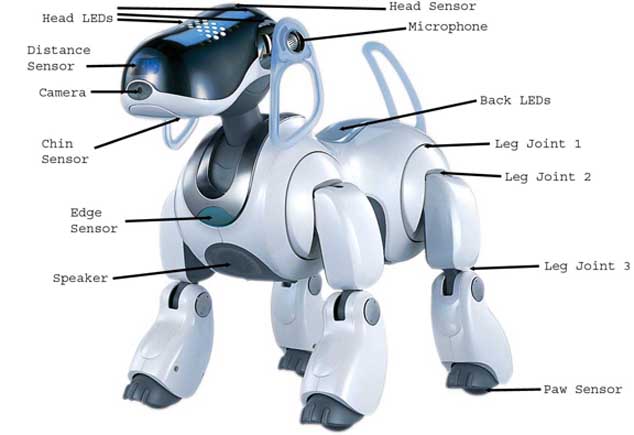
Sony describes the AIBO as an autonomous entertainment robot. Wikipedia defines
an autonous robot as a robot which can perform desired tasks in unstructured
environments without continuous
human
guidance. Many kinds of robots are autonomous to some degree, but different
robots
can be autonomous in different ways. For example, the AIBO monitor's its own
battery level, and returns to its docking station to recharge when its battery
level drops too low.
According to Wikipedia, a fully autonomous robot in the real world has the
ability to:
- Gain information about the environment.
- Work for months or years without
human intervention.
- Travel from point A to point B, without human navigation
assistance.
- Avoid situations that are harmful to people, property or itself
- Repair itself
without outside assistance.
A robot may also be able to learn autonomously. Autonomous learning includes
the ability to:
- Learn or gain new capabilities without outside assistance.
- Adjust strategies
based on the surroundings.
- Adapt to surroundings without outside assistance.
Of course, autonomous robots still require regular maintenance, as do other
machines.... Right now, two of our AIBOs must go to Sony's AIBO hospital.
(From: http://en.wikipedia.org/wiki/Autonomous_robot)
Team Roles
Decide which of you will fill
each of the following roles for this lab:
- AIBO Handler: This person is responsible for making
sure that the AIBO is handled with extreme physical care.
The physical safety of the AIBO rests with the handler. No
other team-member may handle the AIBO without the express permission of
the handler. It is their responsibility that AIBO is not damaged.
- AIBO Trainer: The AIBO learns to respond to vocal
commands, and this person is responsible for all of the vocal
interactions with the AIBO. They should have a clear and
commanding speaking voice which is not heavily accented.
- Discussion Leader: This person will guide the group discussion, making sure that lab report answers will be sufficiently thorough.
- Programmer: This person will be in charge of creating the
code for the program for the AIBO. In this lab, there will not be
programming to do, so the programmer will be in charge of the AIBO
toys: the "Pink Ball" and the "AIBOne" (pronounced "eye-bone").
- Scribe: This person will type the Lab Report as you work on this lab. The scribe
should have Word (or another editor program) open on his/her laptop.
IMPORTANT NOTE: The AIBO is a very expensive and delicate piece of equipment. Treat it with the utmost care.
The AIBO Handler must always have AIBO lay down or pick it up before turning the power off.
When the power is turned off, AIBO's joints go limp
and if it is standing at the time, it will fall and might be damaged.
Note that it is expected that each member of your team to remain in
his/her role for the whole lab.
Your Task
In this assignment, you will become familiar with the AIBO and many of
the features that it possesses. Developing an initial understanding of the
AIBO is important for when you begin programming it.
The AIBO Handler should place the AIBO in a lying position on the floor and turn it on by pressing
the button on its back. The startup procedure will take a few moments as
AIBO repositions its joints.
The AIBO is designed to be an interactive autonomous robot which has
a variety of sensors and can communicate with humans in several ways.
Sight
The AIBO is designed to recognize and respond to human faces.
When it recognizes a face, it will display a triangular group of
a set of 3 LEDs on its face. See if you can get AIBO to recognize
one of your faces.
The AIBO can also recognize its toys, the pink ball and the AIBone.
If the programmer will move one of these very slowly in
front of the AIBO's face, it should follow the movement.
Touch
The AIBO has a variety of sensors, which with the permission of the
AIBO Handler can be lightly stroked. With the permission of the
AIBO handler, one by one, each team member may gently stroke one of the
sets of sensors located on the head, chin, and back.
Sound (Speaking to the AIBO)
The AIBO Trainer can try
calling
out the following voice commands to see how AIBO responds. The AIBO
Trainer must be patient, giving each command one at a time and
then waiting, giving the AIBO amble time to respond. Note that the
AIBO's mood can affect how it
responds to commands. If AIBO isn't happy, it may not respond at all.
The AIBO will be much happier once it has been given a name
and some owners.
- "Hello, AIBO!"
- "Good Morning!"
- "How are you?"
- "Are you sleepy?"
- "Are you hungry?"
- "Good AIBO!"
- "Lay down"
- "Stand up"
- "Walk around"
- "Let's dance"
- "Talk to your friend"
- "What time is it?"
- "Take a picture"
- "What is your name?"
- "What is your owner's name?"
Each AIBO also has a toy bone and ball that it can interact with.
For example the programmer can place
the pink ball in front of AIBO and the AIBO Trainer can say, "Find your
ball." AIBO will scan the area for the pink ball and "play" with it
once it is found. AIBO can also remember
the location of the ball, but if you move the AIBO, it will become
disoriented. The AIBO Handler can pick up AIBO, sit it down facing away
from the
ball and the AIBO Trainer can then ask it, "Where's your ball?"
Each AIBO learns his or her name. The AIBO Trainer can try calling the name which have been given to the AIBO.
There are many other voice questions and/or commands that the AIBO
recognizes--ask your instructor if you want to try more of them.
In addition to understanding communication from humans, the AIBO
attempts to communicate back through a variety of modes, the most
obvious of which is speaking.
Lights and Mode Indicators (Communication from the AIBO)
The AIBO has a large number of LEDs on its face which can be used to
communicate with humans. Different patterns appear for each
emotional and/or physical condition as follows:
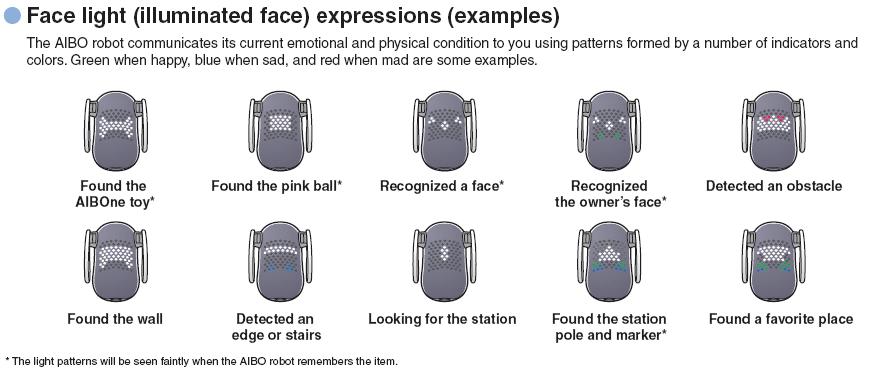
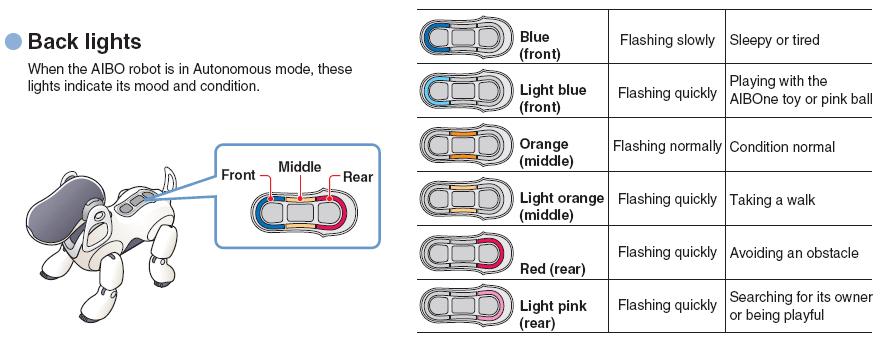
The AIBO also has Back-lights on its back which indicate mood and condition
as follows:
The AIBO has larger lights around its ears which are called mode indicators.
In addition to these non-verbal modes of communication, the AIBO has
been programmed to demonstrate emotions through movement.
Your Lab Report
All lab reports should be self-contained and should contain all of the
following information at the top:
- The lab number: Lab 17
- The name of the AIBO you worked with:
- Who is serving in each of the roles:
- AIBO Handler:
- AIBO Trainer:
- Discussion Leader:
- Programmer:
- Scribe:
for this lab.
As usual, for this lab, your team will submit a Lab Report
entitled yourteam-L17. For
the report, your team should discuss the answers to each of these
questions. Using correct spelling and good grammar, this lab should
then address the following questions:
- Sight: Describe how well the AIBO responded to visual
communication. Did it appear to recognize faces? Was it
able to see its pink ball and/or AIBOne?
- Touch: Describe how well the AIBO responded to touch communications. Did it respond when you "pet" it?
- Sound: Describe how well the AIBO responded to verbal communications. Did it respond to the commands of the AIBO Trainer?
- Responses: Did the AIBO respond to its name?
Describe any non-verbal communication from the AIBO which you
recognized. Did you recognize any LED patterns? Did you
find its motion to be emotionally expressive?
- Applicability: Although the AIBO was designed as a toy, many of its
features could be used in more practical robotic applications.
For each of the following features, describe in a few sentences
of detail a practical application of robotics where this feature could
be useful and how it would be useful there. Use each practical
application only once.
- The AIBO has a video camera in its nose.
- The AIBO has several touch sensors --one on each foot, three on its back, one on the top of its head, and one on its chin.
- The AIBO has a distance sensor in its nose.
- The AIBO has built-in edge detection to detect edges such as a
table edge (Do not trust this feature to keep the AIBO on a table!)
- The AIBO has built-in obstacle avoidance software (Do not trust this feature either!)
- The AIBO has face-recognition software and will recognize human faces.
- The AIBO can store information about certain special faces, so it can recognize it's owner's face.
- The AIBO has a microphone and voice-recognition software and will recognize vocal commands.
- The AIBO can
store information about certain special voices, so it can recognize it's
owner's voice.
- The AIBO has a speaker and can respond to humans vocally.
- The AIBO has adaptive software, so can learn about its environment, including its owner's preferences.
- Active/Passive Sensor Classification: In
our text, we learned the difference between active and passive sensors. Briefly
explain this difference and choose 3 different sensors on the AIBO to classify
as active or passive.
- Simple/Complex Sensor Classification: In
our text, we learned the difference between simple and complex sensors. Briefly
explain this difference and choose 3 different sensors on the AIBO to classify
as simple or complex.
- Autonomy: The AIBO
is designed to be an autonomous robot, which is not true of the Lego
Mindstorms. Briefly describe some of the most important features you
believe contribute to this autonomy.
- Comments and Suggestions: Write a
paragraph that summarizes your team's reaction to RoboLab and to this
lab. If there are any problems you encountered or any questions that
remain, please ask! Also, be sure to include any suggestions you have
for how this lab could be improved.