Zombie Clone Attack!!
Objectives
- Learn about using synchronous communication between robots via mail
- Synthesis concepts learned in previous labs.
- Practice event-driven programming.
- Focus attention on testing and refining the algorithm and code.
Tools and Parts Needed
- Constructed 2-Wheeled "Tracker" Robot
In this lab, you will be asked to put together concepts discussed in our previous labs in order to synthesize and to apply these concepts as well as to learn how to get your robot to send and receive mail from another robot. Since this is the first lab in which robots will interact with one another, it is the first opportunity to refine your code based upon how it well functions compared to the functioning of other robots. It is our last lab on the RCX robots/
Sending Mail to another Robot
The IR port on the front of the RCX (which we have been using to download our programs) can also be used for sending mail using the icon. The
  can be used to store the value
receive by mail in a container.
can be used to store the value
receive by mail in a container.Using Mail in Event-Driven Programming
We have learned that event-driven programming is a computer programming paradigm where the program continually watches for something without stopping and waiting. In this lab, you will need to use event-driven techniques to monitor for mail coming from another robot. The
 icon is used
to set up an event to occur when mail is received. Remember that in
order to monitor for an event in RoboLab, two icons must always be used:
icon is used
to set up an event to occur when mail is received. Remember that in
order to monitor for an event in RoboLab, two icons must always be used:
 .
The green icon Starts Monitoring for the event, and the red icon is a
Event Landing Block to jump to when the event occurs. Just as before,
looping will prove essential.
.
The green icon Starts Monitoring for the event, and the red icon is a
Event Landing Block to jump to when the event occurs. Just as before,
looping will prove essential.Using Hertz for Musical Notes
In this lab you will be given a team number which represents the frequency of pitch in Hertz. Though you will use a container, rather than hard coding the number.
Here is an example:
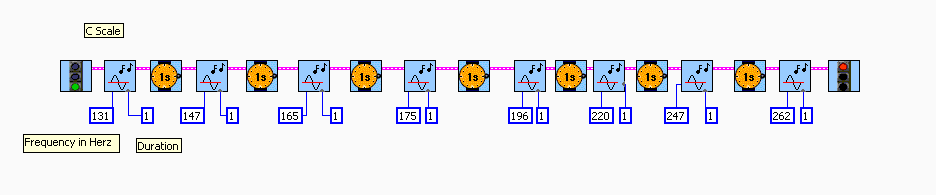
The following represents some pitches of whole notes in Hertz. Your team will be given one of the following pitches.
| Note | Rounded Frequency (Hz) |
|---|---|
| C1 | 33 |
| D1 | 37 |
| E1 | 41 |
| F1 | 44 |
| G1 | 49 |
| A1 | 55 |
| B1 | 62 |
| C2 | 65 |
| D2 | 73 |
| E2 | 82 |
| F2 | 87 |
| G2 | 98 |
| A2 | 110 |
| B2 | 123 |
| C3 | 131 |
| D3 | 147 |
| E3 | 165 |
| F3 | 175 |
| G3 | 196 |
| A3 | 220 |
| B3 | 247 |
| C4 | 262 |
| D4 | 294 |
| E4 | 330 |
| F4 | 349 |
| G4 | 392 |
| A4 | 440 |
| B4 | 494 |
| C5 | 523 |
| D5 | 587 |
| E5 | 659 |
| F5 | 698 |
| G5 | 784 |
| A5 | 880 |
| B5 | 988 |
Competition
Ultimately, your goal in this lab is to design an algorithm which is more successful in sending mail than in receiving mail than other robots are. Bear in mind that the IR communication will work best when the two robots are facing each other during the send/receipt of mail. Thus, your team will need to work to refine your algorithm based upon what happens during the field testing with other robots. Because of this focus on testing and refining your algorithm, all team members will be expected to keep working to refine the algorithm and the code until the competition today.We will have a final competition involving all robots at a time designated by the instructor.
Following this competition, you will be allowed to refine your code and Lab Reports.
Your Task: Zombie Clone Attack!!
You may know that Humans vs. Zombies (HvZ) is a game of moderated tag commonly played on college campuses. A group of human players attempts to survive a “zombie outbreak” by outsmarting a growing group of zombie players. In this game, all players begin as humans, and one is randomly chosen to be the “Original Zombie.” The Original Zombie tags human players and turns them into zombies.This lab is also designed as a moderated game of tag. Each robot will begin with it's own team number stored in a container and displayed on the screen and will try to "tag" other robots to make them clones of itself. Robots will drive about erratically while repeatedly sending out their team number via mail. If they receive mail from another robot, they must change their number to the number they received, effectively creating a "zombie clone".
Some requirements:
- The container will contain the current team number through the game, so each robot must begin with it's original team number in the red container.
- The current team number should be displayed on the LCD screen throughout the game.
- Each robot must be set up to monitor for mail throughout the entire program.
- When mail is received, each robot must make the type of beep given by its original team number and must change its current number to the value received both in the red container and on the screen.
- Each robot must continually drive about in a seemingly random fashion and then regularly sending mail to try to "tag" other robots with its team number by sending its current team number out by mail.
- Note that each robot must be capable of regularly receiving mail, so programs which use any technique to make regular receipt of mail impossible are illegal and will receive substantially reduced credit.
- Having said this, it is to the team's advantage to send mail frequently, because the same IR port is used for both sending and receiving, so in the instant a robot is sending mail, it is unable to receive mail and unable to be tagged. .
- It is also to the team's advantage to drive about, because the robots are required to move about and because IR communication will work best when the two robots are facing each other during the send/receipt of mail.
- Thus, finding an advantageous balance between sending mail and random behavior is desirable.
- Be sure to include explanatory comments to your RoboLab code by
using the Edit Text icon:
 In particular, it is
required that you add the following comments:
In particular, it is
required that you add the following comments:
- Lab L13
- All of your team member's names
- Appropriate comments on the more complicated areas in the RoboLab code
- A description of which other team your team tested with and what occurred.
- Finally, modify your pseudocode, robot, and RoboLab program to improve your robot's performance.
- Answer the questions in your Lab Report.
Your Lab Report
All lab reports should be self-contained and should contain all of the following information at the top:- The lab number: Lab L13
- How long each person served in each of the roles:
- Driver:
- Navigator
- Your Pseudocode: Include the final version of your pseudocode in your Lab Report.
- Your Success: In a paragraph or so, describe how to use your program and whether or not your robot functions as desired. If not, what goes wrong and under what conditions?
- Testing and Refining: In a paragraph or so, describe which other team your team paired with for testing, what happened, and what changes you made in your algorithm during the testing and refining phase.
- Competition: What happened with your robot during the competition phase?
- Comments and Suggestions: Write a paragraph that summarizes your team's reaction to RoboLab and to this lab. If there are any problems you encountered or any questions that remain, please ask! Also, be sure to include any suggestions you have for how this lab could be improved.