A Guessing Game!--More on Communication and Looping in RoboLab
Objectives
- Practice using multiple types of loop constructs
- Learn about stages of software engineering and use them to plan and implement an algorithm.
- Learn to have the robot communicate with humans.
Tools and Parts Needed
- Constructed 2-Wheeled robot
- Two touch sensors
In this lab, you will be asked to put together concepts discussed in our previous labs in order to synthesize and apply these concepts in more challenging programming situations. One of the more challenging types of programming is communication. In this lab, the engineer will play a game with the robot, requiring two way communication between the engineer and robot.
A set of steps which can be used to describe a commercial software development project follows:
SOFTWARE
DEVELOPMENT STAGES:
- REQUIREMENTS ANALYSIS: Analyze
the programming requirements and specifications
For us this means to decide specifically what we are supposed to have the robot do according to the lab requirements. When creating software for customers, requirements analysis is often a very time-consuming process because you need to figure out what is required by users. - DESIGNING THE SOFTWARE
ARCHITECTURE: Design the necessary algorithms and how they are
structurally connected together
For us, this means to create a program design plan, which may be done verbally with your team or on paper using pseudocode. As program requirements get more complicated, planning the design in advance becomes more important. - CODING THE IMPLEMENTATION: Follow
the design plan to create (implement) the program in the code of
the programming language
For us this means following our program design and "coding" the program using RoboLab. Remember that it is best to write and test SMALL segments of code, rather than trying to code the whole thing and then trying to debug. - TESTING & DEBUGGING: Test and
debug the program code
For us this means to test the RoboLab program on our robots and fix all unwanted behaviors - DELIVERY: Deliver the software to
the customer
For us this means to submit it to Moodle! - MAINTENANCE: Continue to support
the software, fixing any problems which are found and adding
needed features
Since we are not marketing the software, we don't do any software maintenance at all, do we?
Your Task
In this lab, your team is required to design and implement an algorithm which will allow the robot to communicate with the engineer by playing a guessing game. In particular, you are required to program your robot to play the "I am thinking of a number between 1 and 10" guessing game with the engineer.- The robot is to choose a number between 1 and 10 once at the beginning of the game, and the engineer must guess it. The robot may not "tell" or "show" the number, but the robot must "remember" this number though the whole game. (Of course for testing purposes, you may want the robot to display it, but in the final version, this should be removed.)
- Your team should program the robot to indicate to whether the engineer's guess is too high, too low, or correct, and you should make this communication from the robot as clear as possible, so if you were to change engineers with an engineer from another group, the new engineer could fairly quickly learn to play the game with your robot. Consider using a rising set of tones for one of these, a falling set of tones for another, and a victory song when the guess is correct. The blue, red, and yellow scrolls are good for victory songs.
- Guessing should continue until the engineer's guess is correct, at which time the robot's behavior should make it clear that the engineer is correct and should show the number which was correctly guessed on the screen. (Except during debugging, this number should NOT be shown on the screen before it is correctly guessed.)
Next. your team must design the software architecture for the guessing game through the creation of initial pseudocode. Only when the entire team agrees that your plan for implementation will work, you must show the pseudocode to the instructor or to a TA. If they also agree that your software design is sound, you will be given a robot and the requested sensors so you can move on to the coding phase. (If they do not agree, you must keep planning... ) The scribe must write this initial pseudocode in the lab report.
- Use the following Hints to design your pseudocode.
- You will need to use at least two different containers in this lab. Be sure you zero (initialize) all the containers you use.
- You will need two types of looping in this Lab. You will also need one or more conditional. The trickiest part of the lab is thinking about when to use a loop and when to use a conditional fork.
- First, consider how to make the robot think of a number between
1 and 10 and remember this number throughout the entire program,
and think carefully about how the engineer will enter his or her
guess at the number. Consider using both
 to loop a
specific number of times and
to loop a
specific number of times and  to loop while the bumper
is not pressed. Although it is not the only way to accomplish
this task, you might consider using the Clicks Container,
to loop while the bumper
is not pressed. Although it is not the only way to accomplish
this task, you might consider using the Clicks Container,  to
store the number of clicks like we did last time, being sure to
zero (initialize) this container at the beginning of the program
as in the example given above. If you want to, you can use
to
store the number of clicks like we did last time, being sure to
zero (initialize) this container at the beginning of the program
as in the example given above. If you want to, you can use
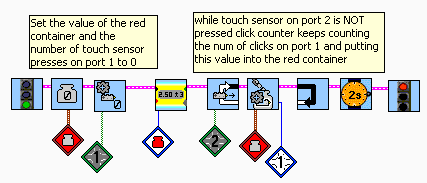
If you choose to use this code, be sure to test it with the display, so you can see that it is working! Note also that zeroing these containers is essential! - The main loop should only end when the engineer has guessed the number correctly. Think about what test you need to do to see if the engineer's guess is correct (this will be your loop test condition).
- Then think about what should go inside this main loop. Consider writing the code which will go inside this main loop before you add the loop itself. Remember that testing small sections of code is best!
- Don't forget that you can use the LCD,
 for debugging and testing!
It can be a great tool!
for debugging and testing!
It can be a great tool!
- Be sure to also include explanatory comments to your
RoboLab code by using the Edit Text icon:
 In particular, it is
required that you add the following comments:
In particular, it is
required that you add the following comments:
- Lab L11
- All of your team member's names
- Comments on each major code area
- Finally, modify your pseudocode, robot, and RoboLab program to improve your robot's performance.
- Answer the questions in your Lab Report.
Your Lab Report
All lab reports should be self-contained and should contain all of the following information at the top:- The lab number: Lab L11
- How long each person served in each of the roles:
- Driver:
- Navigator
- Requirements Analysis: Briefly what is required for the desired tasks, and then describe which sensors and actuators will need to be attached to which ports for your implementation, explaining how each will be used.
- Your Initial Pseudocode: Include the initial version of your pseudocode in your Lab Report.
- Communication: Describe what communication is to be expected from the robot. How will the engineer know if his or her guess is too high? too low? or exactly right? Also, describe what communication is to be expected by the robot. How will the engineer enter his or her guess each time? How will the robot know the engineer is done guessing?
- Error Handling: If I ask you to think of a number between 1 and 10 and you guess outside that range, you would be in error. Discuss what your robot will do if the user does something unexpected, like guessing 0 or 12. Your robot's behavior should make sense.
- Modifications: Do not leave early today. Instead, continue to improve and modify your code. Discuss what modifications were discovered in the debugging phase which required modification to your initial code and what additional modifications you made which were not required.
- Your Final Pseudocode: Include the final version of your pseudocode in your Lab Report.
- Your Success: In a paragraph or so, describe any additional information which is needed to use your program and whether or not your robot functions as desired. If not, what goes wrong and under what conditions?
- Comments and Suggestions: Write a paragraph that summarizes your team's reaction to RoboLab and to this lab. If there are any problems you encountered or any questions that remain, please ask! Also, be sure to include any suggestions you have for how this lab could be improved.