int that can be referenced as: mpg[0], mpg[1], mpg[2],
mpg[3], mpg[4], mpg[5].
The computer allocates consecutive memory locations to the elements of this
array, and they can be pictured as shown on the right:
structure in the sense that it is a
group of variables combined as a single entity, but it differs because:
int) to more complex (such as the
Date class you defined and used already).
data type variable name[integer value representing size];
|
When working on the assignment using files, recall the method used to store the filename that is input from the user...it is an array of chars:
char myFilename[10]; // create a variable called myFilename that consists of 10 chars
|
Each character is an element of myFilename, and each one can be accessed/referenced directly using its index, which is the position that element has in the array.
| Warning: |
Remember that computers start counting from zero, so the index is one
minus the position that you would automatically place the element.
Therefore, the 4th letter of myFilename has the index of 3,
so the reference is myFilename[3].
|
|---|
Another example of using arrays is to store information such as the number of miles per gallon each car out of group of 6 can get. When declaring an array, you can either (1) simply use an actual number (as the 10 did for myFilename above) to indicate how many cars are in the array or (2) use a constant identifier instead. The advantage of the second approach will be touched upon when we discuss modifying the elements of the array:
| Simple Way | Better Way | ||
|---|---|---|---|
int mpg[6]; |
const int NUM_AUTOS = 6; // constants are often CAPITALIZED int mpg[NUM_AUTOS]; |
const because you cannot use a variable size in an
array declaration in most versions of C++, including the ANSI Standard.
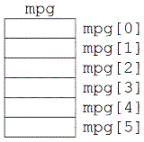
Upon declaring the array as we have above, there are now 6 elements of type
int that can be referenced as: mpg[0], mpg[1], mpg[2],
mpg[3], mpg[4], mpg[5].
The computer allocates consecutive memory locations to the elements of this
array, and they can be pictured as shown on the right:
|
|
mpg[1] = 34; // recall that the 2nd car has index of 2-1 = 1 mpg[5] = mpg[1]/2; // mpg[1] has the value 34 stored in it |
if( mpg[1] > 30 ) {
    cout << "Gas will be cheap for your second car!\n";
}
if( mpg[5] == 2 * mpg[1] ) {
    cout << "Gas will be twice as expensive for car number 6!\n";
}
|
for or
while loop (the for loop may make more sense here
because you may think "for each element in the array, do <something>").
As with any program, the statements in the loop may be whatever you want.
The following program prompts the user for the number of miles each car he/she
owns drives per gallon.
The two versions below perform the same operation.
Whereas the left side has the loop structured in a more intuitive sense
(first car has index of 1), the version on the right is closer to what the
computer views array elements (the first element has index of 0).
| Intuitive Version | Computer's Version | ||
|---|---|---|---|
#include <iostream>
using namespace std;

const int NUM_AUTOS = 6;
typedef int MPG_array[NUM_AUTOS];

int main() {
    MPG_array mpg;
    int count;

    // Start counting from 1 to 6
    for( count = 1; count <= NUM_AUTOS; count++ ) {
	cout << "Enter the MPG for vehicle ";
	cout << count << ": ";
	cin >> mpg[count - 1];
    }

    return 0;
}
|
#include <iostream>
using namespace std;

const int NUM_AUTOS = 6;
typedef int MPG_array[NUM_AUTOS];

int main() {
    MPG_array mpg;
    int count;

    // Start counting from 0 to 5
    for( count = 0; count < NUM_AUTOS; count++ ) {
	cout << "Enter the MPG for vehicle ";
	cout << count + 1 << ": ";
	cin >> mpg[count];
    }

    return 0;
}
|
typedef on the fifth line (shown
in red) to let
the compiler know that we are equating the word MPG_array
to mean the same as the "int [NUM_AUTOS]" variable type
(i.e. an array).
Secondly, by using the constant variable NUM_AUTOS when declaring
the array, we can use the same constant to control the loop index to make
sure we stay within the defined loop bounds.
Finally, the loop on the left side subtracted one from the index before
accessing the data located there because the counter variable for the
loop started from one and went to six.
The version on the right version added a one before asking the user for
the miles per gallon because the expected way to count cars is from one
to six.
The reference to the array element is still from zero to five in either
case, however.
A typical run of this program might produce the following input and output:
Enter the MPG for vehicle 1: 34 Enter the MPG for vehicle 2: 10 Enter the MPG for vehicle 3: 15 Enter the MPG for vehicle 4: 20 Enter the MPG for vehicle 5: 49 Enter the MPG for vehicle 6: 14 |
mpg[6]
(the seventh car, when only six were defined).
What does that operation mean and more importantly, what does it do?
The program would have simply put that value, be it 1000, 0, or 2, into
the next integer-sized chunk of memory located after the memory block
set aside for the array.
Although this may seem to be a harmless act, it results in a very
undesirable situation - the compiler might have already reserved this
chunk of memory for another variable, and now it has changed even though
the programmer did not intend it to be modified.
The behavior of the program is then unpredictable and odd and rather
difficult to debug.
| WARNING |
A common error is to resize the array but forget to change the range
of indexes that your program accesses, either in a loop or directly.
Consider the following code fragment:
main() function.
Although this may seem to be a simple thing to do, it is rather difficult
as your program becomes more complicated.
By using a constant when declaring an array, you can use the same constant to define loop bounds, so the size of the array and loop bounds change automatically:
|
|---|
char.
#include <iostream>
#include <fstream>

using namespace std;

const int MAX = 1000;
char store[MAX];

int main() {
    char character;
    int count;
    ifstream in_stream;

    in_stream.open("data.cpp");
    in_stream.get(character);

    // Read the first MAX (1000) characters from the file and store in file
    for( count = 0 ; ! in_stream.eof() && count < MAX ; count++ ) {
    	store[count] = character;
    	in_stream.get(character);
    }

    in_stream.close();

    // Now output the chars onto the console.
    while (count > 0)
	cout << store[count--];

    return 0;
}
|
!in_stream.eof() && count <
MAX
" at the head of the for loop avoids the possibility of a range
bound error.
data type name[] |
// It is correct syntax to omit the length of the array in the parameter,
// so that information must be passed in as a separate parameter.
double average( int list[], int length ) {
    double total = 0;
    int count;
    for( count = 0 ; count < length ; count++ )
	total += double(list[count]);
    return (total / length);
}
|
&"), they are effectively like
call by reference parameters.
In other words, when the functions execute with array parameters, they do
not make private copies of the arrays they are passed because doing so this
would potentially be very expensive in terms of memory.
| WARNING |
Array elements can always be permanently changed when passed as arguments to
functions unless the const modifier is included in the parameter
declaration.
|
|---|
Consider the following function that takes as input three arrays in which the third one will contain the sum of the corresponding elements of the first two:
// This function assumes that the length of the three arrays are the
// same. OTHERWISE A LOGICAL ERROR CAN OCCUR!
void add_lists( int first[], int second[], int total[], int length ) {
    int count;
    for( count = 0 ; count < length ; count++ )
	total[count] = first[count] + second[count];
}
|
first[count] = first[count] * 10; |
const to the first two array parameters
acts as a safety measure to prevent unintended consequences of calling
add_lists(...):
// The elements of first and second are now constants
void add_lists(const int first[], const int second[], int total[], int length) {
    int count;
    for( count = 0 ; count < length ; count++ ) {
	total[count] = first[count] + second[count];
	first[count] = first[count] * 10;
    }
}
|
For this assignment, you are to create a class that can be used to handle a large set of integer data. An object in this class has a array member variable that is guaranteed to contain no more than 100 integers. The user is presented various options to use, insert values and display this array.
main() function repeatedly offers the user a menu
of options, each of which is provided by an appropriate member
function or an overloaded friend function (your choice).
On the menu include the following options:
switch statement to handle the menu options.
    // Course: CSC 306 Introduction to Programming with C++
    // Name: Your Name
    // Assignment #17: <Put a brief sentence about your program here.>
    /*
       Purpose: <Put a more in-depth description of the program here.>
     */