CSC 306 Introduction to Programming with C++
More About Streams in C++
Chapter 5.3
Objectives
- Learn more about C++ streams in the context of file-handling
- Learn to maipulate I/O at the character level.
Important Definitions
Character I/O using get( ), put( ) and
putback( )
Our use of input streams so far has been restricted to reading a single "word"
of data at a time where the start and end of words are indicated by
whitespaces, such as a space, multiple spaces, a tab, or a return.
A word is a sequence of characters, and sometimes we will need to read or write
a single character at a time---this is possible using the get()
and put() stream member functions.
Suppose we have a file with only the word (i.e. a sequence of characters)
"pineapple" in it.
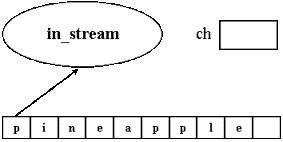
Having opened the file for reading, the first character in the input stream is the
letter 'p' (recall that characters in C++ are indicated using single quotes), as
shown to the right.
|
|
The following code fragment uses the get() member function to extract
the 'p' only:
|
|
  char ch = '';
  in_stream.get(ch);
|
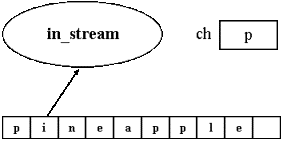
The use of get(ch) has two effects:
- the variable ch is assigned the value
'p',
- the ifstream in_stream now is positioned to read the
string
"ineapple" as shown to the right.
|
|
Conversely, you can write single characters to a file opened via an ofstream
by using the member function "put(...)", which takes as an argument
a char.
The following example will put the character '4' out into a file
stream out_stream previously opened for writing:
|
|
  char out = '4';
  out_stream.put( out );
|
C++ also includes a "putback(...)" member function for ifstreams to
put a character back into the input stream to be read on the next call to
the get(...) function.
Suppose that we opened a file as shown above that has the string
"pineapple" in it.
The following code fragment gets the first 'p', then puts a
'7' into the input stream.
The next call to get( ) will not get the character 'i'
from pineapple, but the '7' that was put in.
|
|
  char gChar = '';
  in_stream.get( gChar );  // read the first char: 'p'
  in_stream.putback('7');  // put a '7' at the head --> 7ineapple
  in_stream.get( gChar );  // read the next char: '7' (not 'i'!)
|
Checking for the end-of-file using eof()
Special care has to be taken when reading characters from a file to check if
the end has been reached.
Most versions of C++ incorporate an end-of-file (EOF) flag into the ifstreams, and
programmers use the member function "eof()" for ifstreams to test if
this flag is set to TRUE or FALSE.
If the stream is positioned at the end of a file and the EOF flag is FALSE,
the statement:
will set the EOF flag to TRUE, but unfortunately, will leave the char
variable "ch" in an unpredictable state.
It is important to always check the EOF flag using in_stream.eof()
before using the result of the get() member function!
Example of Reading and Writing to Files
The following simple program uses the techniques detailed above to copy the contents
of an input file with the name entered by the user simultaneously to the screen
and to the output file "copyFile".
|
|
#include <iostream>
#include <fstream>

using namespace std;

int main() {
  char character;
  char in_file_name[16];

  ifstream in_stream;
  ofstream out_stream;

  cout << "\nEnter the input file name (maximum of 15 characters):\n";
  cin >> in_file_name;
  in_stream.open(in_file_name);

  if( in_stream.fail() ) {
    cout << "\nInput file opening failed.\n";
    exit(1);
  }

  out_stream.open("copyFile");

  in_stream.get(character); // This will set the EOF flag to false if empty

  // while NOT (!) at the eof, get a character from the input file and
  // copy it (echo) to the screen via cout and to the output file.
  while( !in_stream.eof() ) {
    cout << character;
    out_stream.put(character);
    in_stream.get(character);
  }

  out_stream.close();
  in_stream.close();

  return 0;
}
|
Note that the user will type in the name of the file to read, but the name of the
output file is explicitly set as "copyFile".
Also, there is nothing in the program that checks to see if the input filename is
15 characters or less.
Streams as Function Arguments
The above program can be rewritten so that the operation of reading and writing
the characters is put into its own function.
Streams can be arguments to functions, but in the function definition, the stream
parameters must be call by reference rather than call by value.
Below is a version of the program with a programmer defined function
"copy_to(...)" that passes streams.
|
|
#include <iostream>
#include <fstream>

using namespace std;

void copy_to( ifstream& in, ofstream& out); // function declaration

/* MAIN PROGRAM: */
int main() {
  ifstream in_stream;
  ofstream out_stream;
  char in_file_name[16];

  cout << "\nEnter the input file name (maximum of 15 characters):\n";
  cin >> in_file_name;
  in_stream.open(in_file_name);

  if( in_stream.fail() ) {
    cout << "\nInput file opening failed.\n";
    exit(1);
  }
  out_stream.open("copyFile");

  copy_to(in_stream, out_stream); // the while loop is in this function

  out_stream.close();
  in_stream.close();

  return 0;
}
/* END OF MAIN PROGRAM */

/* FUNCTION TO COPY A FILE TO ANOTHER FILE AND TO THE SCREEN: */
void copy_to(ifstream& in, ofstream& out) {
  char rChar; // Notice that this variable is declared only in copy_to()

  in.get( rChar );
  while( !in.eof() ) {
    cout << rChar;
    out.put( rChar );
    in.get( rChar );
  }
}
/* END OF FUNCTION */
|
Take special note that the variable rChar is declared and used only in the
function copy_to.
Another example
The following program further illustrates these input and output techniques.
In addition, it demonstrates how the >> operator differs from
the get( ) member function because it skips whitespaces.
It first creates a test file called "Integers" containing the integers 51, 52,
53, 54 and 55 with spaces between them, then counts the number of integers and
non-blank characters are in the file.
|
|
#include <iostream>
#include <fstream>

using namespace std;

int main() {
  char character;
  int number = 51;
  int count = 1;
  ofstream out_stream;
  ifstream in_stream1;   /* Stream for counting integers. */
  ifstream in_stream2;   /* Stream for counting characters. */

  /* Create the file */
  out_stream.open("Integers");

  while (count <= 5) {
    out_stream << number++ << ' ';
    count++;
  }
  out_stream.close();

  /* Count the integers in the file */
  in_stream1.open("Integers");
  count = 0;
  in_stream1 >> number;
  while( !in_stream2.eof() ) {
    count++;
    in_stream1 >> number;
  }
  in_stream1.close();
  cout << "There are " << count << " integers in the file,\n";

  /* Count the non-blank characters */
  in_stream2.open("Integers"); // This file must be opened again.
  count = 0;
  in_stream2.get(character);
  while( !in_stream2.eof() ) {
    count++;
    in_stream2.get(character);
  }

  in_stream2.close();
  cout << "represented using " << count << " characters.\n";

  return 0;
}
|
This program will produce the following output:
|
|
There are 5 integers in the file,
represented using 10 characters.
|
NOTE: the operator ">>" jumps over the whitespace characters
in the file that separate the five integers when used in counting characters in the
last part of the program.
Thus, "low-level" character input and output via the functions "get( )"
and "put( )" are more precise because blanks are not skipped.
"High-level" input and output of other kinds of data types using the stream
operators ">>" and "<<" can be more intuitive because
whitespaces are skipped.
Assignment Specifics
This assignment may be completed individually or in a team of two students.
You will write a program that will give you an idea how a compiler is written to
check and even correct syntax.
This program will read in the source code of another C++ program and fix incorrect
uses of the << or >> operators used with cin and cout:
| Incorrect | Fixed
|
cin <<
cout >>
|
cin >>
cout <<
|
This corrected version will be written into an output file.
More precisely, your program
- prompts the user to type in the name of the input C++ file to be corrected
and takes as input the filename.
If this input file does not exist, your program should quit gracefully (i.e.
output a message saying what is wrong before quitting).
- prompts and inputs from the user the name of the file to write the corrected
version.
You may assume that this filename will not be the same as the input filename.
- has a function with input and output streams as arguments to do the
corrections.
Note that you must allow for the possibility that in the input file, there
may be any number of blanks spaces (including none) between the
cin operator and <<.
However, there should only be one blank space between then in the
replacement C++ output version.
The same conditions apply for the cout operator and
>> as well.
| HINT: |
You will probably find it easier to first assume that there is only 1
space all of the time and get this easier version of your code working
before adding the modification to allow for any number of spaces.
|
|---|
- will inform the user of how many of each type of correction your program
made.
Notes:
When you are finished writing and testing your assignment, drop your source code
file, YourLastName_306A11.cpp, into the CSC306_A11 dropbox on the
Academic server.