CSC 306 Introduction to Programming with C++
Using Streams for I/O
Chapter 5.1-5.2 (until page 229)
Objectives
- Learn about C++ streams in the context of file-handling
- Learn to open and close files for input or output
Important Definitions
- file, streams, input streams, output streams
- object, instance, class, member function
- open file, close file, reading, writing
- C-string, class, connect,
Files, Streams and Classes
All the programs we have looked at so far get input from the keyboard and output
to the screen.
If we could only input from the keyboard and output to the screen, it would be
quite tedious to handle large amounts of input data, and output data would
always be completely lost as soon as we turned the computer off.
To avoid these problems, we can store input or output data in a secondary
storage device, which is commonly the hard-drive, or the disk.
Data is stored on the storage device as a data structures called a file.
Simply put, a file is a region on the disk that stores a linear sequence of
bytes for information, whether it be characters or images or other data.
The end of the file is typically indicated by a special end-of-file
character for programs that must "read everything in the file" and does not
know how many bytes to read beforehand.
For example, a file containing the string "welcome to my file" would start with
bytes representing the character 'w', followed by 'e', 'l', 'c', 'o', 'm' ...
and so forth, looking something like this:

Reading and writing to a file involves using streams.
A stream is essentially a channel in which data flows from the source to a
destination.
Input streams direct data from a source, such as the keyboard or a file
into variables of a program, and output streams send data out.
As you may have realized by now, the standard input stream cin
is an input stream from the keyboard and the standard output stream
cout sends data to the screen.
Input and output streams such as "cin" and "cout"
are examples of stream objects.
Learning about streams now as objects is a good way to introduce some of
the syntax and ideas behind the object-oriented aspect of C++.
To use file input and output streams, we will need to include a C++ header
file called <fstream> that contains the necessary operations
to perform these functions.
Programs that read and write to disk must therefore have the following
include directive at the top:
Finally, like variables, you must declare any file streams before you can use
them.
These declarations are usually at the top of the source code or function
definitions, and have the format of "ifstream in-name" for
input and "ofstream out-name" for output streams.
For example, the following statements inform the compiler to create a stream
called in_stream that is an input-file-stream object and another
called out_stream that is an output-file-stream object:
|
|
ifstream in_stream;
ofstream out_stream;
|
Objects are instances of a class type.
We will explore classes in more detail later, but for now you can think of them as
a complex variable type.
| WARNING:
|
This analogy works up to a point.
For example, you cannot use assignments with class objects, so the following
code fragment will not work:
in-stream = 5; // given that in-stream is declared a ifstream
|
|
Member Functions
A function that is associated with a certain type of object is called a member
function of that object.
You have already used member functions setf and
precision for formatting our output streams using cout.
These functions are defined in more detail on pages 219-220 in the text, but
they are included briefly for cout:
|
|
// Use cout's member function "set flags" function, called setf
// The argument here means to use fixed point rather than scientific notation
cout.setf(ios::fixed);

// Use cout's setf function again, but this time, the argument tells cout to
// show the decimal point.
cout.setf(ios::showpoint);

// Use cout's member function, called precision
// The argument indicates to display 2 digits of precision after the decimal point
cout.precision(2);
|
| NOTE:
| A flag in objects is simply a property that has only 2 options.
In this case, either cout will display a double in fixed point or
in scientific notation.
Similarly, either it outputs a number with the decimal point or not.
|
File Operations
Opening and Closing Files
Having created a stream with the declaration, we can connect it to a
file (i.e. open the file) using the member function
open(filename).
For example, the following statement will 1) open a file called "myFile",
assuming one with that exists in the current directory (more on this later),
and 2) connect in_stream to the beginning of the file:
|
|
in_stream.open("myFile");
|
Once connected, the program can read from that file.
Pictorially, this is what happens:

The ofstream class also has an open(...)
member function, but it is defined differently.
Consider the following statement:
|
|
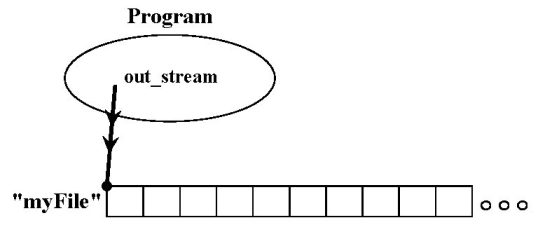
out_stream.open("myFile");
|
This also connects out_stream to "myFile", but because out_stream
is an ofstream object, the function also either:
- creates a file called "myFile" if one does not exist already in the current
directory or
- discards the file's previous contents if the file already exists.
Pictorally, we get a stream of data flowing out of the program:
To disconnect the ifstream in_stream to whatever file it opened,
we use its close() member function:
To close the file that out_stream opened, we use its
close() function, which also adds an end-of-file marker
to indicate where the end of the file is:
Dealing with I/O Failures
File operations, such as opening and closing files, are a notorious source
of runtime errors due to various reasons.
Well-written programs always should include error checking and
handling routines for possible problems when dealing with files.
Error checking and handling generally involves the programmer inserting
statements in functions that perform I/O to check to see if any of the
operations have failed.
In C (the predecessor to C++), the system call to open a file returns a
value after the function is called.
A negative number means if the operation failed in some respect, which
the program can check to see if reading from a file is alright.
In C++, a simple error checking mechanism is provided by the member
function fail():
This function returns TRUE if the previous stream operation for
in_stream was not successful, such as if we tried to open a
non-existent file.
If a failure has occurred, in_stream may be in a corrupted state,
and it is best not to attempt any more operations with it.
The following example code fragment safely quits the program entirely in
case an I/O operation fails:
|
|
#include <iostream>  // for cout definition
#include <fstream>   // for file I/O definitions
#include <cstdlib>   // for the fail member function

using namespace std;

int main() {
  ifstream in_stream;

  in_stream.open("myFile");
  if( in_stream.fail() ) {
    cout << "Sorry, the file couldn't be opened!\n";
    exit(1);
  }

  // the rest of the main function using in_stream defined here...

} // end of the main function
|
After opening the "myFile" file, the if conditional checks to see if
there was an error.
If so, the program will output the apologetic error message and then exits.
The exit(1) function from the library "cstdlib" enables the program
to terminate at that point and have it return a "1" versus a "0".
Reading and Writing with File Streams
As file I/O streams work in a similar way to cin and
cout, the operators ">>" and
"<<" perform the same direction of data for files, with
the exact same syntax.
For example, execution of the following statement will write the number 25,
a space, the number 15 and another space into the file opened by
out_stream:
|
|
out_stream << 25 << ' ';
out_stream << 15 << ' ';
|
The extra space after the 25 is important because data is in a text file is
separated by a space, tab or newline.
Without the space, a read operation on that file would put the value 2515 into
the variable.
For example, suppose that after the previous statement, the program opens the
same file with the input stream in_stream.
The following statement would read the number 25 (not 2515) from that file:
The End-of-file (EOF) for Systems that Implement eof()
So far, the assumption was that the programmer knew exactly how much data to read
from an open file.
However, it is common for a program to keep reading from a file without any idea
how much data exists.
Most versions of C++ incorporate an end-of-file (EOF) flag at the end of the file
to let programs know when to stop---otherwise, they could read data from a
different file, which can be disastrous.
Many development environments have I/O libraries that define how the
member function eof() works for ifstream variables
to test if this flag is set to True or False.
Typically, one would like to know when the EOF has not been reached, so
a common way to use this function is as a negative boolean value.
An alternative implementation is to keep reading using the >>
operator, which succeeds when there is still something left to read.
The following two code fragments highlight the possibilities:
Using "eof()"
| Using ">>"
|
|
while( !in_stream.eof() ) {
  // statements to execute
  // while EOF has not been
  // reached
}
|
|
|
while( inputn << in_stream ) {
  // statements to execute
  // while reads are successful
}
|
|
Here is an example of a program that essentially uses the second technique
mentioned above to read all the numbers in a file and output them in a
neater format.
The while loop to scan through a file is located in the
make_neat(...) function.
|
|
// File Name: Neatify.cpp (Display 05-06.cpp)
// Illustrates output formatting instructions.
// Read all the numbers in the file rawdata.dat and write the numbers
// to the screen and to the file neat.dat in a neatly formatted way.
#include <iostream> // for cout
#include <fstream>  // for I/O member functions
#include <cstdlib>  // for the exit function
#include <iomanip>  // for the setw function
using namespace std;

void make_neat(ifstream& messy_file, ofstream& neat_file,
             int number_after_decimalpoint, int field_width);

int main() {
    ifstream fin;
    ofstream fout;

    fin.open("rawdata.txt");
    if( fin.fail() ) {  // oops the file did not exist for reading?
        cout << "Input file opening failed." << endl;
        exit(1);
    }

    fout.open("neat.dat");
    if( fout.fail() ) { // oops the output file open failed!
        cout << "Output file opening failed.\n";
        exit(1);
    }

    make_neat(fin, fout, 5, 12);

    fin.close( );
    fout.close( );

    cout << "End of program." << endl;
    return 0;
}

// Uses iostreams, streams to the screen, and iomanip:
void make_neat(ifstream& messy_file, ofstream& neat_file,
              int number_after_decimalpoint, int field_width) {

    // set the format for the neater output file.
    neat_file.setf(ios::fixed);
    neat_file.setf(ios::showpoint);
    neat_file.setf(ios::showpos);
    neat_file.precision(number_after_decimalpoint);

    // set the format for the output to the screen too.
    cout.setf(ios::fixed);
    cout.setf(ios::showpoint);
    cout.setf(ios::showpos);
    cout.precision(number_after_decimalpoint);

    double next;
    while( messy_file >> next ) {  // while there is still stuff to read
        cout << setw(field_width) << next << endl;
        neat_file << setw(field_width) << next << endl;
    }
}
|
This is program Neatify.cpp, which is
essentially Display 5.6 of your text.
The input file rawdata.txt must be in the
same directory (folder) as the program in order for it to open it successfully.
The program will create a file called "neat.dat" if one does not exist yet or
will open the file and discard the previous contents otherwise.
To download the "rawdata.txt" text file, you will need to right-click on the link.
File Names and C-Strings
The program above will try to open the file called "rawdata.txt" and output its
results into a file called "neat.dat" every time it runs, which is not
very flexible.
Ideally, the user should be able to enter filenames that the program will use
instead of the same names.
In past assignments, we have used the char data type that allows
users to store manipulate a single character at a time.
A sequence of characters such as "myFileName.dat" can be stored in a
C-string, which is declared as follows:
This will create a variable named C-string_name that can hold a string
of length up to LEN - 1 characters.
The square brackets after the variable name indicate to the compiler the maximum
number of character storage is needed for the variable.
| Warning: | This number must be one greater than the number of
actual characters! |
C-strings are an older type of string that was inherited from the C language, and
people frequently refer to both types as "strings", which can be confusing.
Putting it all Together
The following program will ask the user for the input and output filenames.
After testing for open failures, it will read three numbers from the input
file and write the sum into the output file.
This program, called Streams.cpp is adapted
from Display 5.4 of the text:
|
|
// File Name: Streams.cpp
// Ask the names for the input and output files.
// Reads three numbers from the input file, sums the numbers, and writes the
// sum to both the screen and the output file specified by the user.
#include <fstream>
#include <iostream>
#include <cstdlib>

int main() {
    using namespace std;
    char in_file_name[16], out_file_name[16]; // the filenames can have at most 15 chars
    ifstream in_stream;
    ofstream out_stream;

    cout << "This program will sum three numbers taken from an input\n"
         << "file and write the sum to an output file." << endl;
    cout << "Enter the input file name (maximum of 15 characters):\n";
    cin >> in_file_name;
    cout << "\nEnter the output file name (maximum of 15 characters):\n";
    cin >> out_file_name;
    cout << endl;

    // Condensed input and output file opening and checking.
    in_stream.open(in_file_name);
    out_stream.open(out_file_name);
    if( in_stream.fail() || out_stream.fail() ) {
        cout << "Input or output file opening failed.\n";
        exit(1);
    }

    double firstn, secondn, thirdn, sum = 0.0;
    cout << "Reading numbers from the file " << in_file_name << endl;
    in_stream >> firstn >> secondn >> thirdn;
    sum = firstn + secondn + thirdn;

    /* The following set of lines will write to the screen */
    cout << "The sum of the first 3 numbers from " << in_file_name
         << " is " << sum << endl;

    cout << "Placing the sum into the file " << out_file_name << endl;

    /* The following set of lines will write to the output file */
    out_stream << "The sum of the first 3 numbers from " <<
              in_file_name << " is " << sum << endl;

    in_stream.close( );
    out_stream.close( );

    cout << "End of Program." << endl;
    return 0;
}
|
Assignment Specifics
Your task in this assignment is to write a program that reads an unspecified
number of real numbers from a file, finds the maximum, the minimum, and
computes the average.
Name your source code file YourLastName_306A10.cpp.
The program when outputs these numbers to the screen and to an output file.
An appropriate series of steps for the program could be:
- Ask the user for the filename of the input and output data file.
Both are needed.
- Open both the specified input and output files and exit immediately
with a meaningful message to the user if an error occurs.
- Read all the real numbers from the data input file, which you may assume
has only numbers of type
double separated by blanks and/or
line breaks, and there is at least one real number (i.e. it is not empty).
- Echo each of the numbers read from the input file onto the screen in easy
to read format with 5 decimal points of accuracy.
- Find the maximum, the minimum, the count of how many numbers were in the
file, and the average of these numbers while you are reading the data.
- Output this information in easy to read format with 5 decimal points of
accuracy to both an output file and to the screen.
- Be sure to explicitly close all of the input and output streams that you
opened before the program ends. Do not declare or open any unused streams.
Be sure to:
This assignment must be completed individually.
When you are finished with your assignment, drop your source code into the
CSC306_A10 dropbox on the Academic server.